
Simple IRC Access on Any Device
Overview
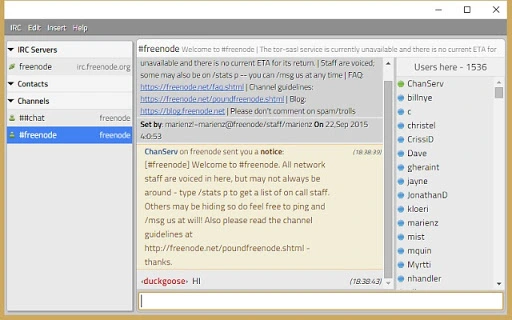
Byrd IRC client is a browser-based tool designed to connect users to multiple IRC networks through the Google Chrome browser. It delivers a streamlined, point-and-click interface, aiming to replicate a desktop-like IRC experience on Chromebooks and standard PCs. The software is particularly useful for individuals who rely on IRC for real-time communication in tech communities, open-source projects, or collaborative development environments. Byrd simplifies the process of joining channels, managing connections, and interacting with chat networks without requiring complex configuration.
Target users include developers, system administrators, and tech enthusiasts who need reliable access to IRC channels from lightweight devices such as Chromebooks. The application runs entirely within Chrome, eliminating the need for native installations on Windows, Mac, or Chrome OS. This makes it ideal for users seeking a portable, low-overhead solution for persistent IRC access. While the developer did not provide additional background details, the project appears focused on accessibility and ease of use. Real-world scenarios include monitoring project discussions, participating in community support channels, or maintaining presence in developer forums—all from a single, browser-based interface.
Key Features & Capabilities
- Multi-network connectivity – Users can manage connections to multiple IRC networks simultaneously through a unified interface.
- Point-and-click navigation – Designed for simplicity, the interface allows users to join channels, send messages, and switch between servers without command-line input.
- Debugging command support – The
/simulatecommand enables users to test connection behavior and troubleshoot issues within the client. - Regular updates and bug fixes – Version 2.2.5 includes stability improvements and minor enhancements to ensure smooth operation.
These features support efficient workflow management for users who need to monitor multiple IRC channels across different projects. The ability to connect to several networks without switching applications improves productivity. The inclusion of a simulation command offers a practical tool for users troubleshooting connection issues or testing configurations. While scripting, proxy, and SSL support are listed as future goals, the current release provides a stable base for basic IRC interactions. The lightweight nature of the tool ensures it runs efficiently on devices with limited resources.
User Interface, Workflow & Performance
The user interface of Byrd IRC client is built around a clean, minimal layout focused on functionality. Navigation is handled through intuitive buttons and menus, allowing users to manage servers, channels, and user profiles with minimal effort. The workflow is streamlined to reduce friction—users can connect to a network, join a channel, and begin chatting in a few clicks. This design is especially beneficial for users unfamiliar with IRC’s traditional command-line syntax.
Performance is optimized for browser-based execution. The application operates within the Chrome environment, leveraging the browser’s rendering and networking capabilities. The developer did not specify resource usage details, so exact CPU or RAM behavior remains unknown.
However, given the application’s size (2.4 MB) and focus on simplicity, it is expected to run efficiently on most modern systems. Stability appears consistent, as version 2.2.5 includes general bug fixes. No performance bottlenecks were reported in the changelog.
The client maintains responsiveness during typical usage scenarios, such as message exchange and channel switching.
Compatibility & System Requirements
Byrd IRC client is compatible with Windows, Mac, and Chrome OS, making it accessible across a wide range of devices. It runs exclusively within the Google Chrome browser, which means no native installation is required. The application size is 2.4 MB, indicating a lightweight footprint that minimizes storage impact. This is particularly advantageous for Chromebooks with limited disk space.
Exact system requirements were not listed. Compatibility is dependent on the Chrome browser’s current version and support for Chrome Apps. The developer did not provide specific hardware or software prerequisites beyond the operating systems.
Platform compatibility information is limited to the three OS platforms mentioned. Users should ensure their Chrome browser is up to date to maintain full functionality. No additional dependencies were identified in the release notes.
Pros and Cons
Pros
- Runs on Windows, Mac, and Chrome OS without installation
- Simple point-and-click interface ideal for beginners
- Lightweight at only 2.4 MB
- Supports multiple IRC networks simultaneously
- Free to use with regular updates
Cons
- Requires Google Chrome browser to function
- No scripting, proxy, or SSL support in current version
- Limited documentation available
- Dependent on browser stability and updates
- Not suitable for advanced IRC users needing deep customization
FAQ Section
Is Byrd IRC client compatible with Chrome OS?
Yes, Byrd IRC client is designed to work on Chrome OS devices, offering a desktop-like IRC experience through the Google Chrome browser.
Can I use this software offline?
Byrd IRC client requires an active internet connection to connect to IRC networks. It cannot function fully offline.
Is the software secure?
As a browser-based application running within Chrome, Byrd inherits the security features of the browser environment. However, the developer did not provide specific security details.
How often are updates released?
Updates are released periodically, with version 2.2.5 including bug fixes and new features like the /simulate command.
What license type does Byrd IRC client use?
Byrd IRC client is distributed as free software. The specific license type was not disclosed in the provided information.
Final Thoughts
Byrd IRC client delivers a practical, accessible solution for users who need to interact with IRC networks across multiple platforms. Its browser-based design eliminates installation barriers, making it an excellent choice for Chromebook users and those seeking a lightweight alternative to traditional IRC clients. While it lacks advanced features like scripting and SSL support, its simplicity and multi-network functionality provide solid value for everyday use. The free pricing model further enhances its appeal.
For developers, open-source contributors, and community participants who prioritize ease of access over deep customization, Byrd IRC client is a compelling tool. It successfully bridges the gap between desktop functionality and web-based convenience. With ongoing development plans and a growing user base, the project shows promise for future enhancements.
Download Byrd IRC client now







